Blog / Categories
Amazon Removed Your Book From a Category: Why, and What to Do
You assign three categories at publication. Weeks later the book is listed in two, and nobody told you. This is normal Amazon behavior, it is not a bug, and the reason it happens says something uncomfortable about how most publishers pick categories in the first place.
What actually happens
Amazon periodically re-checks whether a title belongs where it was placed. The check looks at the book itself — title, subtitle, description, keywords, interior sample — against what the category node is for. When the two do not match, the placement is removed.
Three things make this hard to notice:
- There is no notification. No email, no dashboard flag, no entry in your KDP account history.
- Your KDP settings still show the category you chose. The removal happens on the storefront, not in your metadata, so the two disagree and only the storefront is real.
- Rank in that category simply stops existing. If you were watching a Best Sellers Rank line that disappeared, this is a common explanation.
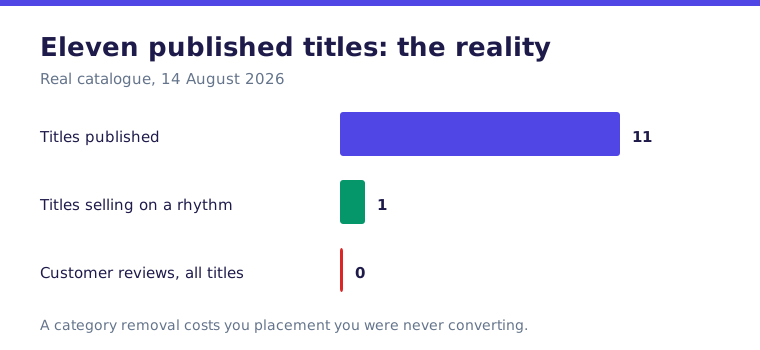
We watched this happen to a puzzle and activity title that had been placed in a scientific subject category. The category had very few competing books, which is exactly why it had been chosen. It was also, self-evidently, not a science book. Amazon removed it.
Why the empty category was always the trap
Category competition and category fit are usually inversely related. A category with almost no books in it is usually empty because it is not where anyone shops for your kind of book — not because you found something everyone else missed.
The strategy of hunting for the lowest-competition node comes from a real observation: it is easier to rank in a thin category. That part is true. What it leaves out is that ranking is worthless if the shoppers browsing that node do not want what you sell. A number one badge in a category with no traffic converts nothing, and it is exactly the placement Amazon is most likely to strip.
The reframe that works better: stop asking which category is easiest to win, and start asking what it costs to get seen there.
Choosing by measured entry cost
Every category has a de facto price of admission — the sales velocity required to appear on the first screen a shopper sees. You can measure it, roughly, without any paid tool.
Open the category's best seller list. Record the Best Sellers Rank of the books sitting at positions 10, 20 and 50. That range is your entry cost.
Read it this way:
| BSR at position ~20 | What it means for a new title |
|---|---|
| Under 20,000 | Heavy traffic. Visibility requires real sales velocity you do not have yet. |
| 20,000 to 200,000 | Usually workable. A few sales a week can put you on the first screen. |
| Over 500,000 | Thin. Check whether the category has genuine shopper traffic before choosing it. |
| No ranked books at all | Almost certainly a fit problem waiting to happen. |
Two cautions on the numbers. Best Sellers Rank is not comparable between marketplaces — a rank of 50,000 on Amazon.com and the same figure on Amazon.ca describe completely different sales volumes, because the catalogs and the traffic are different sizes. And category node identifiers are not transferable between marketplaces either; the node you researched on one storefront does not exist under the same identifier on another.
What to do when a category has been removed
- Check the live storefront, not your KDP settings. Scroll to the product details block on the detail page and read the category lines there. That is the only authoritative list.
- Decide honestly whether the removal was correct. If a browsing shopper in that category would be surprised to find your book, it was correct, and re-requesting it will fail or be reversed again.
- If it was wrong, ask KDP support to restore it — and make the case with the book, not with the strategy. Quote the description and the interior content that match the node's subject.
- Replace, do not just delete. An open category slot is wasted shelf space. Choose a replacement by measured entry cost.
- Fix the metadata that caused the mismatch. If you needed the category badly enough to reach for it, the description and keywords probably do not support it either.
The check to run before you publish
- Would a shopper browsing this category be unsurprised to see this book next to the others? If not, choose again.
- Do the title, subtitle and description contain the vocabulary of the category, or only the vocabulary of the workaround?
- Have you recorded the BSR at positions 10, 20 and 50 for each candidate category?
- Did you research those categories on the marketplace you are actually publishing to?
- Have you diarized a date, a month out, to re-read the live product details block and confirm the placements survived?
Category behavior described here was observed on Amazon.ca and Amazon.com in July and August 2026. Amazon changes its category taxonomy and its enforcement without announcement, and the number of categories a title may hold has changed more than once. Verify against the live detail page rather than against your KDP settings, and see our corrections policy if you find an error here.
Why Amazon removes a category at all
Category placement is not a field you own. It is a claim you make, and Amazon audits it. When a book sits in a category whose buyers would not consider it the thing they searched for, the placement gets withdrawn — usually without a message, and usually noticed only when you check the listing yourself.
This is not punishment. A category is a promise to a shopper about what they will find. A puzzle book in a scientific category breaks that promise for every shopper who browses it, and Amazon has more to lose from that than you have to gain.
Choose categories on the price of the ticket
The instinct is to find the least competitive category and sit in it. The better question is what a placement actually costs to hold: how many copies a week the books in that category are moving, and whether your book plausibly belongs there to a browsing buyer.
A category that is easy to enter because nothing sells there gives you a rank badge and no readers. A category with real traffic where your book genuinely fits is harder, slower, and the only one worth holding.
What to do when it happens
- Check the listing, not your notes. The KDP dashboard may still show the category you selected while the live page no longer carries it. The live page is the truth.
- Do not re-request the same node. If it was removed once for fit, it will be removed again, and repeating the request is not neutral.
- Re-select on fit, not on ease. Ask what a shopper browsing that category expects to find, and whether your cover would look out of place next to the others.
- Recheck a week later. Placement changes are silent in both directions.